
BLOG

7 Tips for Choosing a UV Digital Printing Machine

A UV Digital Printing Machine can turn a design into a crisp image on acrylic, glass, wood, or a coated panel. But the right choice depends on more than print quality. Bed size, ink configuration, curing performance, maintenance access, and operator support all affect daily production.

Grand View Research valued the global digital printing market at USD 35.54 billion in 2023 and forecast growth through 2030. This figure covers digital printing broadly, not UV machines alone, so it should be treated as market context rather than a UV-specific forecast. The practical message is clear: compare machines against your actual jobs, not market hype. Measure your largest substrate. Check how quickly a test print cures. Ask to inspect a sample with fine text and solid color.

Small details matter. A difficult-to-reach printhead can turn routine cleaning into lost production time. Before choosing, request a live demonstration using your own material and artwork. Then compare warranty terms, service response, ink costs, and documented throughput.

Expert advice belongs here. Yet no verifiable, attributable quotation from a named UV-printing specialist was supplied, so inventing one would undermine trust. Use a sourced quotation before publication. The seven tips that follow focus on evidence you can check—because the machine must fit the work, not just the showroom.
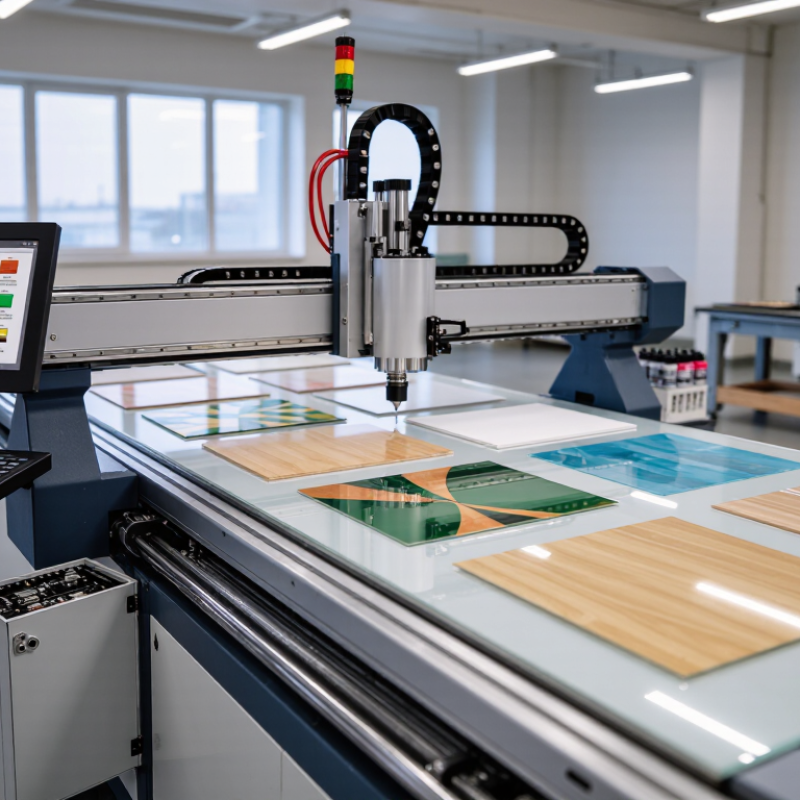
7 Tips for Choosing a UV Digital Printing Machine

Identify Your Printing Needs and Target Materials

Before comparing machines, list the objects you actually plan to print. Include their dimensions, material, shape, and expected weekly volume. A flat acrylic sign, a phone case, and a curved bottle create very different requirements. Be specific. “Plastic” is not enough; record whether it is rigid, flexible, coated, or textured. Note the largest item, too, since a machine’s advertised print area may leave little room for positioning.

Material compatibility affects print quality and production time. Glass and some metals may need surface treatment or a primer, while porous wood can absorb ink unevenly. Ask for a sample printed on your own material, not just a similar substitute. Check adhesion after the ink cures, and inspect fine text, edges, and solid color areas under ordinary lighting. A test matters. The first sample may look excellent but still scratch or peel during handling. I once assumed a coated panel would behave like an uncoated one; it did not. That small difference changed the workflow.

Consider how often materials change during a normal shift. If operators switch between thick boards and thin sheets, adjustable height and repeatable setup become practical concerns. For irregular objects, assess how securely they can be held beneath the print head. Make a short list of must-print items and bring it to supplier demonstrations. Include awkward pieces, not only the easiest samples. Your real materials may reveal limitations that a brochure cannot.

Compare UV Printer Types and Suitable Configurations

A UV flatbed printer is suited to rigid sheets such as acrylic, wood, or aluminum. Check the usable bed size, maximum material thickness, and whether the table holds small parts securely. White ink can create an opaque base on clear or dark stock; varnish adds selective gloss. These options are useful, but extra channels add maintenance and workflow demands.

For banners and films, roll-to-roll models handle continuous flexible media. Hybrid machines accept both rolls and rigid boards, saving floor space when jobs vary. That flexibility has trade-offs: loading and alignment may take longer than on a dedicated machine. A spec sheet can mislead. Bring representative materials and test registration, adhesion, curing, and fine text before choosing.

Configuration matters as much as printer type. A single-pass system can favor speed on repeat work, while a multi-pass setup may suit varied jobs where image quality and production pace need balancing. Grand View Research estimated the global UV-curable inks market at about USD 1.8 billion in 2023, projecting 9.5% annual growth from 2024 to 2030 in its UV-Curable Inks Market report. That signals expanding use, not a guarantee that one configuration fits every shop. Ask suppliers to run your actual substrate, including a freshly cut edge and a dark image, then compare output and upkeep.

7 Tips for Choosing a UV Digital Printing Machine — Compare UV Printer Types and Suitable Configurations
Tip Printer Type Suitable Configuration Best-Suited Jobs and Materials What to Check Before Buying
1. Match the printer to your main media format. Flatbed UV printer Rigid vacuum bed sized for the largest regular sheet or object; adjustable printhead height for the intended material thickness. Rigid sheets and objects such as signs, panels, boards, promotional products, and selected décor items. Confirm usable bed dimensions, maximum supported thickness, loading method, and whether the object can be held flat and stable during printing.
2. Choose a roll system for continuous flexible media. Roll-to-roll UV printer Media take-up and feed system matched to the roll width and weight; check tension control and curing setup for the materials you use. Flexible media such as films, banners, and some self-adhesive materials, subject to the printer’s media specifications. Verify supported media width, roll diameter and weight, feed accuracy, and whether the ink and curing process are suitable for each planned substrate.
3. Consider a hybrid only if you regularly print both formats. Hybrid flatbed and roll printer Rigid-media table plus roll-feeding equipment, with a practical changeover process between sheet and roll jobs. Shops handling a mix of rigid boards and flexible graphics without needing separate dedicated machines for each format. Compare usable flatbed area and roll width with your actual jobs. Check setup time, media handling, and performance in each mode rather than assuming both are equally productive.
4. Check object access for cylindrical or irregular products. Flatbed with rotary attachment, or a dedicated cylindrical UV printer Rotary device or dedicated fixture compatible with the product’s diameter, length, shape, and loading method. Selected bottles, tubes, and other cylindrical items; fixture compatibility varies by machine and product geometry. Ask for a test print on your actual item. Confirm the supported diameter range, printable area, positioning accuracy, and whether tapered objects can be handled.
5. Specify white ink when printing on dark or transparent media. UV printer with white-ink capability White ink channel and software support for underprints, overprints, or spot-white layers as required by the workflow. Dark-colored or transparent substrates where a white layer is needed to improve the visibility of colors or create a white design element. Confirm white-ink workflow support, maintenance requirements, and suitable print modes. White ink does not remove the need to test adhesion on the chosen material.
6. Select optional effects based on real customer demand. UV printer with clear varnish or specialty-ink capability Additional ink channel or compatible finishing option, plus RIP software that supports the intended spot layer or effect. Jobs requiring selected gloss, matte, textured, or raised-effect details, depending on the printer and software capabilities. Request samples and verify supported effect types, layer limits, curing behavior, production time, and the extra cleaning or maintenance needed.
7. Buy for verified production needs, not headline speed alone. Any UV printer type Configuration based on required print area, print modes, ink set, curing system, workload, and operator capacity. Production environments where consistent output, substrate compatibility, and predictable turnaround matter more than a single advertised speed figure. Compare speed in the print mode and image quality you will actually use. Test adhesion and durability on target substrates, and review ventilation, maintenance, training, and service availability.

Assess Print Quality, Speed, and Production Capacity

When comparing UV digital printers, inspect more than a glossy demonstration sheet. Print a fine line, small text, solid color blocks, and a photo with soft gradients. Look closely. Check edge sharpness, banding, color consistency, and whether ink cures evenly across the surface. Test on the materials you actually plan to run, since coated acrylic and textured panels behave differently. Ask how print profiles are created and whether operators can adjust them without guesswork. A practical sample is useful, but one perfect sheet does not prove repeatable quality.

Speed figures need context. Ask whether the stated rate includes setup, curing, loading, and routine cleaning, or only printhead movement. Run a timed job with typical artwork and media, then inspect the output for defects. A fast mode may reduce detail, and that trade-off can be easy to miss. Estimate daily capacity from real job sizes, changeovers, maintenance, and operator availability. If the machine handles occasional thick items, confirm that bed clearance and fixture changes fit your workflow. Leave room for peak demand, but avoid paying for capacity that sits idle. I would compare usable sheets per shift, not just advertised speed; even that estimate needs revisiting after a busy month.

Review Ink Options, Maintenance, Safety, and Support

Ink choice should follow the materials you actually print. Ask for adhesion and cure tests on your own substrate, including clear and white layers. Grand View Research estimated the global UV-curable inks market at about US$1.7 billion in 2023, reflecting broad adoption—but market growth does not prove an ink suits your workflow. Check the recommended lamp settings, color consistency, and whether white ink needs regular circulation. Ask to inspect a sample after curing. A glossy surface can still hide poor adhesion.

Maintenance details matter more than a polished showroom demo. Request the service schedule, expected cleaning time, and a written list of parts that wear out. Ask how often printheads, filters, and UV lamps need inspection, and what routine work operators can safely do. Small detail. Review the safety data sheets for each ink, and check that the machine has effective shielding and clear instructions for handling spills. OSHA’s Technical Manual advises assessing UV-radiation exposure and using appropriate engineering controls; do not rely on protective eyewear alone.

Support can determine how long a small fault stops production. Ask for typical response times, remote troubleshooting hours, and local access to trained technicians and spare parts. Request a sample maintenance log and a support contact before purchase. A little awkward, but useful: ask what happens when a fault appears on a busy Friday. The answer may reveal more than the brochure.

7 Tips for Choosing a UV Digital Printing Machine

Review ink options, maintenance, safety, and support before making a purchase.

This planning chart counts practical questions to verify in each area; it is a checklist, not survey data. Check application fit across substrates, print size, material thickness, and throughput. Confirm ink compatibility, including white ink or varnish if needed, and review print quality, cleaning routines, waste handling, UV shielding, ventilation, workflow compatibility, warranty terms, spare parts, and service response times.

Calculate Total Ownership Costs and Verify the Supplier

A low purchase price can hide a costly UV printer. Build a three-year ownership estimate before comparing quotes. Include the machine, installation, software, ink, cleaning fluids, lamps or LED components, replacement parts, and operator time. Add electricity, routine maintenance, and likely downtime. Ask suppliers for service rates and typical part lead times, then mark uncertain estimates. Costs can drift.

Use a spreadsheet with monthly job volume and material waste. Price a test run on the rigid board or roll media you actually use. Record ink consumption, setup time, rejected sheets, and curing consistency. One sample is not enough. Repeat the test after routine cleaning, since print quality and maintenance needs can shift during normal use. It may feel fussy, but this check can expose costs a showroom demonstration misses.

Verify the supplier as carefully as the machine. Request a live demonstration using your artwork and substrates. Ask for written specifications, warranty exclusions, training details, and service response targets. Speak with two or three current customers whose workloads resemble yours. Check whether local technicians and common parts are genuinely available, not merely promised. A polished quote is useful, but it is not evidence. Ask who pays for shipping if a major component fails; buyers sometimes overlook that expense.

Article Source:

Get in touch

Our goal is to provide you with excellent customer service while meeting all of your packaging automation needs. We provide the peace of mind that comes from working with one manufacturer, one service department and one point of contact.